Building My Personal Telegram AI Agent: A Practical, Tool-Using Assistant
I wanted an assistant that could do more than chat. I wanted one that could run useful tools, remember context, automate scheduled tasks, and stay close to my real workflow.
So I built this project: a personal Telegram-based AI agent powered by pydantic-ai, a Google model, and a focused Python architecture.
Source Code: You can find the complete project repository on GitHub at alaminkouser/agent.
This post walks through what I built, why I designed it this way, and what makes it portfolio-worthy.
Project Goal
The goal was simple: create a reliable personal AI operator that I can message from Telegram and use for real tasks, not demos.
The bot can:
- respond conversationally with streamed output
- use web search and web fetch tools
- call MCP toolsets (notebook vault, browser automation, SerpAPI MCP)
- update my public website status via a custom tool
- schedule future tasks through a cron-style file queue
In short, this is an AI assistant with action capability, not just text generation.
High-Level Architecture
The system is intentionally modular:
app/main.pyboots a Telegram bot, registers handlers, and launches a cron worker threadapp/client/*handles Telegram interaction (/start, text messages, authorization, message formatting)app/agents/main.pybuilds the core AI agent with model, instructions, tools, and capabilitiesapp/agents/tools/*contains focused tools (status_put,cron_create,current_datetime)app/cron/worker.pyruns due scheduled tasks from.DATA/cronand sends results back to Telegram
This separation keeps transport (Telegram), reasoning (agent), and automation (cron/jobs) loosely coupled and easy to extend.

Why Telegram as the Interface?
Telegram gives me:
- instant availability from phone and desktop
- async interaction without building a custom frontend
- straightforward bot integration with
python-telegram-bot - a clean command + chat model for agent workflows
For a personal operator, Telegram is the fastest route to daily usability.
AI Layer: pydantic-ai + Tool-First Design
The core agent is created in agent_main() with:
- a Google-hosted model (
gemma-4-26b-a4b-it) - templated instructions (Jinja2)
- built-in tools (
WebSearchTool,WebFetchTool) - MCP toolsets for notebook, browser control, and search
- skill directories via
SkillsCapability
I chose a tool-first architecture so the model can decide when to call utilities and external systems rather than forcing brittle hardcoded flows.
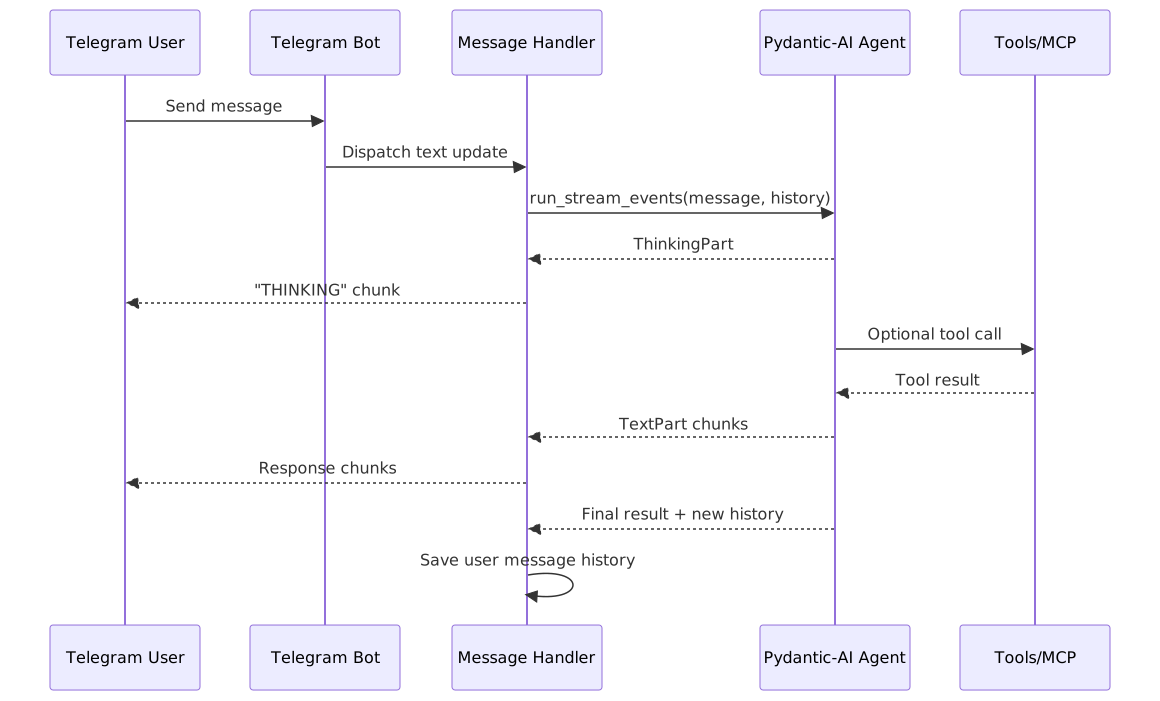
Streaming Events for Better UX
Instead of waiting for one final response, the bot streams agent events and displays progress in chunks:
- thinking segments
- tool-call events
- text outputs
- final message history updates for continuity
This makes interactions feel alive and transparent. Users can see when the assistant is reasoning versus executing.
Scheduled Automation with a File-Based Cron Queue
One of my favorite parts is the scheduled task system.
The cron_create tool writes jobs into .DATA/cron as timestamped files.
The background worker continuously checks this directory, runs due tasks through the same agent pipeline, and delivers results to Telegram.
Why this approach works well:
- no external queue dependency
- easy to inspect/debug manually
- durable enough for personal automation
- trivial to backup and migrate
It is simple infrastructure with practical power.
Real-World Utility: Website Status Updates
The status_put tool bridges AI and personal branding.
From chat, I can set a concise status shown on my website (alaminkouser.com/status/) through a dedicated CLI command.
This is a good example of “small feature, high leverage”: tiny code footprint, immediate day-to-day value.
Reliability and Safety Choices
A few implementation choices help keep the system reliable:
- user restriction middleware ensures only my Telegram user can interact with the bot
- environment-driven secrets (
.env) keep tokens and keys out of code - startup notification ("BOT IS ONLINE") confirms the service is healthy
- markdown chunking + media-aware messaging prevents Telegram length/format issues
- exception handling returns visible errors instead of silent failures
These are not flashy features, but they make the assistant trustworthy in real use.
Tech Stack
- Python
pydantic-ai-slim[google]python-telegram-botpydantic-ai-skillsJinja2telegramify-markdown[mermaid]python-dotenvlogfire
Challenges I Solved
1) Turning model output into chat-safe content
Raw model responses are not always Telegram-ready. I used telegramify-markdown to split long content and support rich output types (text, photo, file) in a unified path.
2) Keeping context between messages
I persist message history per user session so the assistant can continue conversations naturally across turns.
3) Mixing synchronous and async runtime concerns
The bot runs polling while a cron worker runs in parallel. I handled this with a separate daemon thread that runs an async worker loop.
What I Learned
This project reinforced an important engineering lesson:
use simple, composable pieces to build powerful systems.
I did not need a massive platform. A clean Telegram client layer, a capable tool-using agent core, and a small scheduler gave me a personal AI system that is genuinely useful.
What’s Next
Planned improvements:
- stronger observability and structured run tracing
- retries/backoff around external tool calls
- richer scheduling controls (update/cancel/list jobs)
- better prompt and tool auditing for long-term reliability
- optional multi-user mode with proper auth and per-user memory
agent, ai, ai-agent, automation, bot, cron, gemma, llm, mcp, model-context-protocol, personal-assistant, pydantic, pydantic-ai, python, python-telegram-bot, scheduling, serpapi, telegram, telegram-bot, tool-calling, web-search